Introducing Smart search: turn any material into an effective prior art search
Today we're launching Smart search, our latest feature designed to respond to everyday realities and how patent professionals actually work. Smart Search accepts any combination of materials: text, images, PDFs, Microsoft Office documents, and uses AI to synthesize them into a search query representative of their technical content. This eliminates the need to manually piece together information from different sources, letting you work flexibly with whatever materials you have. Smart search is also a critical building block for the automated novelty search workflows in the forthcoming IPRally Agent.

What is Smart search?
Patent search rarely starts with a single, perfectly formatted text description. More often than not, you're working with an invention disclosure form, a few images, PowerPoint slides with text, images, flowcharts, etc explaining the concept, and perhaps some additional notes, all scattered across different files. Until now, searching with these diverse materials meant first studying the materials in detail, defining the essence of the invention or technology, and manually synthesizing everything into text or Boolean queries.
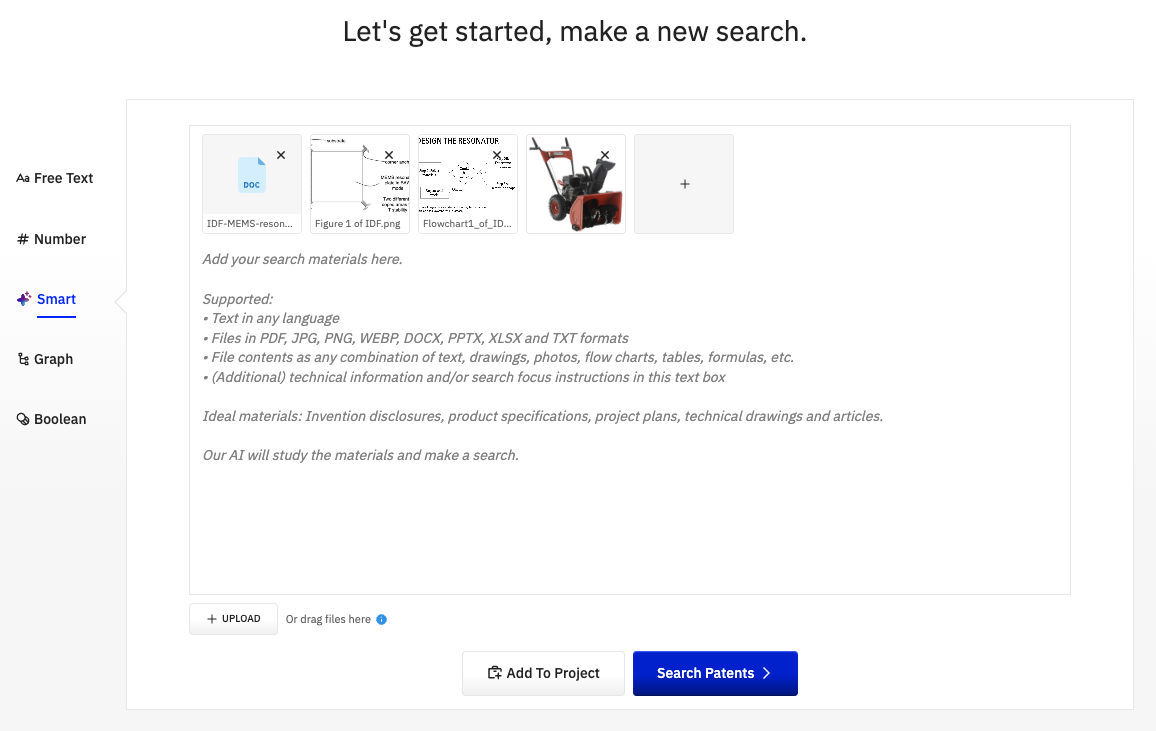
Smart search lets you use multiple files, formats and modalities to launch a search quickly. Simply drag and drop more or less any search materials and let the AI synthesize them into a single rich AI search query. This simplifies the beginning of the search workflow significantly and creates a comprehensive, more complete search input.
In line with our transparency and trust-building goals, the user will also see how the AI understood each single information source, and what the query is: we present it in an intuitive patent claim format with the most essential features in a first “claim” and optional or preferred features in dependent “claims”. The query is also editable for maximum control.
Another reason for using claim-format queries is that IPRally's proprietary patent retrieval AI has been trained specifically on claims, making them the optimal format for accurate AI-powered patent searches.
Ideal use cases
Smart search is particularly valuable for:
Novelty and patentability searches: When you create or receive an invention disclosure in any format, you can run the first prior art search for it extremely quickly.
State of the art analysis: Upload research papers, manuscripts, images from competitors' products, and your own technical notes to build a comprehensive search query that captures key aspects of the technology.
Freedom to operate studies: Run a quick search with product specifications, prototype images, or other technical documentation to search for potential blocking patents across multiple dimensions of your product.
R&D intelligence: Researchers can upload experimental results, prototype images, and technical descriptions to quickly understand the patent landscape around their innovations.
Infringement and Evidence of Use analyses: Upload material covering a potentially competing product or process, filter the results to your own portfolio, and spot intellectual property to improve your business or negotiation position.
How Smart search works
The workflow is straightforward:
1. Add your materials
Drag and drop or select multiple files from the following formats:
- Images (PNG, JPG, WEBP)
- PDFs
- Word documents (DOCX)
- PowerPoint presentations (PPTX)
- Spreadsheets (XLSX)
Add any additional text description you want to include, or give some brief context or instructions.
2. Let AI study and process the materials
Smart search uses large language models to analyze each file individually, extracting relevant technical information. You can see exactly how the Smart search interpreted each file, giving you full transparency into the process.
3. Review (and edit) the search query
Just like with our Free text search, you'll see the AI-generated search query (mock claim) built from all your input materials. You can review it, edit it if needed, and then re-run the search.
4. Get results
Review your search results as usual, with the confidence that all your input materials have been considered comprehensively.
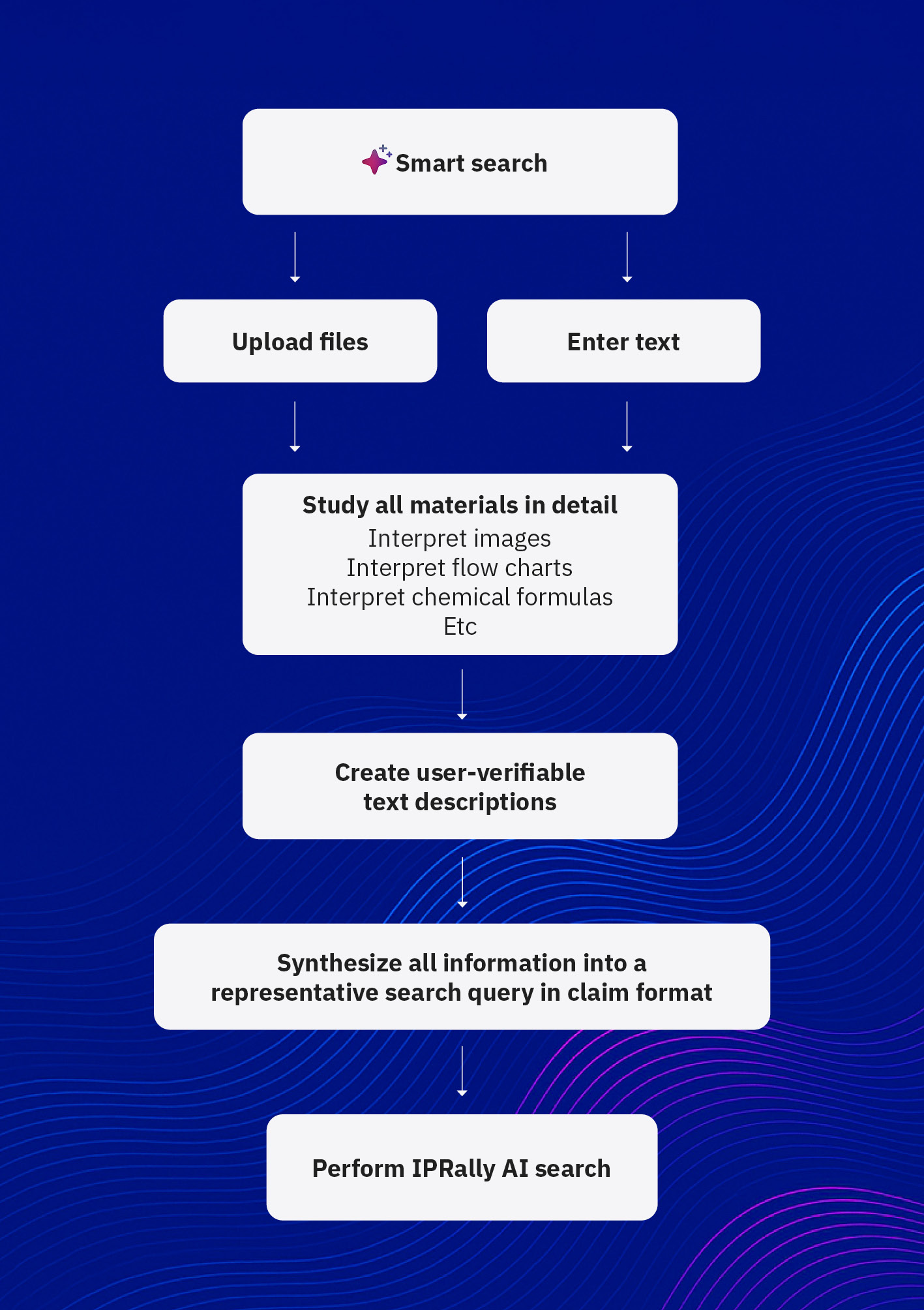
This approach ensures you maintain full control and visibility throughout the process while letting AI handle the heavy lifting of synthesizing diverse materials.
Watch Smart search in action
What to know about Smart search
- Free text search remains available: For users who prefer a non-Gen AI search option, our traditional Free text search continues to be available and fully supported.
- Image search has been phased out since Smart search covers these features as an improved, more flexible version.
- The Refine button in Free text search will be phased out in the near future since Smart search can perform the same functionality in a more powerful way.
- Supported file formats: The formats listed above cover most situations. Support for additional formats like video and audio files may be added in the future. Let us know your needs!
- AI processing visibility: You'll always see what information was extracted from your files before the final search query is generated. This transparency ensures you can verify the AI's interpretation and make adjustments if needed.
- Editable queries: The AI-generated search query in claim format is always editable. You have full control to adjust emphasis, add specific terminology, or refine the scope before running the search.
- The search graph will be viewable, but not editable in Smart search. We recommend editing the claim-format query, in case you need to adjust the target of the search. Copying the claims into the Free text search, will allow graph-level control, if needed.
Smart search is built on our existing Generative AI infrastructure and follows the same careful approach to AI assistance that we use in features like Ask AI and Smart filters.
Looking ahead
Smart search is a significant step toward our vision of transparent fully automated patent search workflows. By enabling AI to work with diverse input materials, we're laying the groundwork for future capabilities. The same search workflow and multi-format input capability will be provided as a starting point of our novelty search Agent, out soon.
Join our webinar to see Smart search in action
We're hosting a webinar on January 22 where we'll demonstrate Smart search and show you how to get the most out of this new capability. You'll see real-world examples, learn best practices, and have the chance to ask questions. Register here.
Learn more in the help center
For step-by-step guidance on using Smart search, including supported file types and best practices for reviewing and refining queries, see our Help center.
Try Smart search today
Smart search is available now for all IPRally users. Start your free trial to experience how Smart search, along with features like Projects, Ask AI, and Smart filters, can transform your patent search workflow.
